To followup on this post: http://sms-hints-tricks.blogspot.com/2015/05/override-sccm-reboot-time.html
Say you just wanted simply extend the reboot of machine by a few hours and not permanently?
Simply edit the registry:
HKEY_LOCAL_MACHINE\SOFTWARE\Microsoft\SMS\Mobile Client\Reboot Management\RebootData\ InitiatedTimeStamp
Add the number of seconds you wish to have then kill the ScNotification.exe process and restart the SMS Agent Host.
When this happens the SCNotification application should kick back in after a few seconds. It will read the changed registry value and use the new time for the reboot.
Saturday, May 16, 2015
Wednesday, May 13, 2015
Skype for Business, forced install
Be aware this month, May 2015, any machines that are running Lync 2013 and didn't upgrade last month to Skype for Business will now be forced to Skype
In the SCCM console you will see this update:
Security Update for Skype for Business 2015 (KB3039779)
Bulletin ID: MS15-044
Article ID: 3039779
Date revised: Tuesday, May 12, 2015
Maximum severity rating: Critical
Description:
A security vulnerability exists in Skype for Business 2015 64-Bit Edition that could allow arbitrary code to run when a maliciously modified file is opened. This update resolves that vulnerability.
Applicable languages:
Affected products:
Office 2013
This security update is a part of MS15-044:
Vulnerabilities in Microsoft Font Drivers Could Allow Remote Code Execution (3057110)
This security update resolves vulnerabilities in Microsoft Windows, Microsoft .NET Framework, Microsoft Office, Microsoft Lync, and Microsoft Silverlight. The most severe of the vulnerabilities could allow remote code execution if a user opens a specially crafted document or visits an untrusted webpage that contains embedded TrueType fonts.
From there you can drill down to the Lync / Skype Security update
Once you open this update you will find this:
------------------------------------------------
MS15-044: Description of the security update for Lync 2013 (Skype for Business): May 12, 2015
This security update resolves a vulnerability in Microsoft Lync that could allow information disclosure if a user opens a specially crafted Lync meeting request.
This security update for Microsoft Lync 2013 includes the new Skype for Business client.
Notes
In the SCCM console you will see this update:
Security Update for Skype for Business 2015 (KB3039779)
Bulletin ID: MS15-044
Article ID: 3039779
Date revised: Tuesday, May 12, 2015
Maximum severity rating: Critical
Description:
A security vulnerability exists in Skype for Business 2015 64-Bit Edition that could allow arbitrary code to run when a maliciously modified file is opened. This update resolves that vulnerability.
Applicable languages:
Affected products:
Office 2013
This security update is a part of MS15-044:
Vulnerabilities in Microsoft Font Drivers Could Allow Remote Code Execution (3057110)
This security update resolves vulnerabilities in Microsoft Windows, Microsoft .NET Framework, Microsoft Office, Microsoft Lync, and Microsoft Silverlight. The most severe of the vulnerabilities could allow remote code execution if a user opens a specially crafted document or visits an untrusted webpage that contains embedded TrueType fonts.
From there you can drill down to the Lync / Skype Security update
| Microsoft Lync Basic 2013 Service Pack 1 (32-bit) (Skype for Business Basic) (3039779) | Not applicable | Critical Remote Code Execution |
------------------------------------------------
MS15-044: Description of the security update for Lync 2013 (Skype for Business): May 12, 2015
This security update resolves a vulnerability in Microsoft Lync that could allow information disclosure if a user opens a specially crafted Lync meeting request.
This security update for Microsoft Lync 2013 includes the new Skype for Business client.
Notes
- The download page will still display this update as being for Lync 2013.
- After you apply this May 12, 2015, security update, Lync 2013 will be upgraded to Skype for Business. Get the general information about the new experience in Skype for Business(http://go.microsoft.com/fwlink/?LinkId=529022).
- You can still use the Lync client user interface after you apply this update for Lync 2013 (Skype for Business). Get the general information about how to switch between the Skype for Business and the Lync client user interfaces for Office 365 users(https://support.office.com/en-us/article/Switching-between-the-Skype-for-Business-and-the-Lync-client-user-interfaces-a2394a4c-7522-484c-a047-7b3289742be0?omkt=en-us&ui=en-US&rs=en-US&ad=US)and Lync Server 2013 users
-------------------------------------------
Pay close attention to the note, you will be upgraded to Skype
As this is a security update you should apply it. It will NOT only apply to Skype for Business machines but to any machine running Lync and upgrade them to Skype.
Now if you wish to keep the Lync Interface after the 2nd reboot of Skype, there is a nice article from a Skype for Business MVP:
http://tomtalks.uk/2015/04/important-changes-coming-to-the-lync-2013-client-uiux-in-the-april-2015-client-patch/
The machine will boot and look like Lync. The only difference is that you will see "Skype Meeting" in Outlook when creating a meeting.
Would like to have the machine look like Lync at the next restart and avoid the extra restart?
A friend of mine pointed me to this:
If you put the following key in before the update, you won’t even have to wait for the 2nd reboot, it will be never show the Skype interface.
Now if you wish to keep the Lync Interface after the 2nd reboot of Skype, there is a nice article from a Skype for Business MVP:
http://tomtalks.uk/2015/04/important-changes-coming-to-the-lync-2013-client-uiux-in-the-april-2015-client-patch/
The machine will boot and look like Lync. The only difference is that you will see "Skype Meeting" in Outlook when creating a meeting.
Would like to have the machine look like Lync at the next restart and avoid the extra restart?
A friend of mine pointed me to this:
If you put the following key in before the update, you won’t even have to wait for the 2nd reboot, it will be never show the Skype interface.
Here is the article : https://support.office.com/en-nz/article/Switching-between-the-Skype-for-Business-and-the-Lync-client-user-interfaces-a2394a4c-7522-484c-a047-7b3289742be0


Tuesday, May 5, 2015
Override SCCM Reboot Time
The SCCM reboot counter is controled via the SCNotification application and Policy. Below is a basic policy as seen from WbemTest and Policy Spy.

To modify this we create a local policy. Local Policy will override the machine
WMIC /namespace:\\root\ccm\policy\machine\requestedconfig path CCM_RebootSettings Create PolicySource="local",PolicyVersion="1.0" ,SiteSettingsKey="1", RebootCountdown=259200, RebootCountDownFinalWindow=4400 /NOINTERACTIVE
When you run this command the policy looks like the one below

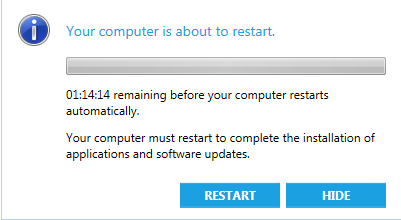
When the restart happens...
Once the machine is set to reboot the registry will change here
HKEY_LOCAL_MACHINE\SOFTWARE\Microsoft\SMS\Mobile Client\Reboot Management\RebootData

The OverrideRebootWindowTime is the Epoch time for the Forced box that cannot be closed to appear.
Rebootby is the Epoch time that will cause the machine to restart.
I am still experimenting to see if the time can be modified as to cheat the reboot time and keep extending or to force it to be shorter. I will detail those finding later.
I did find the Epoch time had to be adjusted. I found the time to subtract 5 hours to adjust for my Timezone,. While it says it is in UTC I think it is UTC but offset from my timzone. Odd., I might find the real solution once I delve deeper into this .


WMIC /namespace:\\root\ccm\policy\machine\requestedconfig path CCM_RebootSettings Create PolicySource="local",PolicyVersion="1.0" ,SiteSettingsKey="1", RebootCountdown=259200, RebootCountDownFinalWindow=4400 /NOINTERACTIVE
When you run this command the policy looks like the one below
When the restart happens...
You have something like this above.
Once the machine is set to reboot the registry will change here
HKEY_LOCAL_MACHINE\SOFTWARE\Microsoft\SMS\Mobile Client\Reboot Management\RebootData
The OverrideRebootWindowTime is the Epoch time for the Forced box that cannot be closed to appear.
Rebootby is the Epoch time that will cause the machine to restart.
I am still experimenting to see if the time can be modified as to cheat the reboot time and keep extending or to force it to be shorter. I will detail those finding later.
I did find the Epoch time had to be adjusted. I found the time to subtract 5 hours to adjust for my Timezone,. While it says it is in UTC I think it is UTC but offset from my timzone. Odd., I might find the real solution once I delve deeper into this .
Subscribe to:
Posts (Atom)