Showing posts with label 2012. Show all posts

Wednesday, July 17, 2013

SQL errors after installing 2840628, (MS13-052)

There have been several reports of failures in the ConfigMgr environment shortly after installing this update. 

Scenario:
Server 2008  / 2008 R2
SQL 2012  / SQL 2012 SP1
ConfigMgr 2012 installed.
 KB 2840628, (MS13-052) .NET 4 update installed.


This update replaces (http://support.microsoft.com/kb/2656405/ )    MS12-034:


From Microsoft:


Issue 1: Configuration Manager 2012

Database replication between sites (CAS/Primary/Secondary) with SQL 2012 will fail.

The rcmctrl.log file on the failing site(s) will contain entries similar the following:

//

Launching 2 sprocs on queue ConfigMgrDRSQueue and 0 sprocs on queue ConfigMgrDRSSiteQueue. SMS_REPLICATION_CONFIGURATION_MONITOR

The asynchronous command finished with return message: [A .NET Framework error occurred during execution of user-defined routine or aggregate "spDRSActivation": ~~System.TypeInitializationException: The type initializer for 'System.Data.SqlClient.SqlConnection' threw an exception. ---> System.TypeInitializationException: The type initializer for 'System.Data.SqlClient.SqlConnectionFactory' threw an exception. ---> System.TypeInitializationException: The type initializer for 'System.Data.SqlClient.SqlPerformanceCounters' threw an exception. ---> System.MethodAccessException: Attempt by method 'System.Configuration.TypeUtil.CreateInstanceRestricted(System.Type, System.Type)' to access method 'System.Diagnostics.SwitchElementsCollection..ctor()' failed. ---> System.Security.SecurityException: Request failed… [truncated for readability]

//

Temporary workarounds

While investigation continues into the best long term solution, the following short term changes can be made to unblock customers in this state:

In SQL Management Studio on the affected server, change the Permission set to Unrestricted for the MessageHandlerService Assembly. This is done in the Assembly properties via:

SQL Server -> Databases -> (Site Database) -> Programmability -> Assemblies -> MessageHandlerService

Once the change is made, replication between sites should automatically recover within 5-10 minutes.


Issue 2: Configuration Manager 2012

Software Update Point synchronization may fail at the end of the sync process. The WSyncMgr.log will have entries similar to the following:

//

error 14: SQL Error Message Failed to generate documents:A .NET Framework error occurred during execution of user-defined routine or aggregate "fnGenerateLanternDocumentsTable": ~~System.TypeInitializationException: The type initializer for 'System.Data.SqlClient.SqlConnection' threw an exception. ---> System.TypeInitializationException: The type initializer for 'System.Data.SqlClient.SqlConnectionFactory' threw an exception. ---> System.TypeInitializationException: The type initializer for 'System.Data.SqlClient.SqlPerformanceCounters' threw an exception. ---> System.MethodAccessException: Attempt by method 'System.Configuration.TypeUtil.CreateInstanceRestricted(System.Type, System.Type)' to access method 'System.Diagnostics.SwitchElementsCollection..ctor()' failed. ---> System.Security.SecurityException: Request failed… [truncated for readability]

//

Temporary Workarounds

Similar to Issue 1, the SMSSQLCLR assembly Permission Set can be changed to Unrestricted. From SQL Management Studio:

SQL Server -> Databases -> (Site Database) -> Programmability -> Assemblies -> SMSSQLCLR


Issue 3: Configuration Manager 2007 <Unconfirmed>

Client location requests for content do not return any Distribution Points. The MP_Location.log on the Management Point will have entries similar to the following:

//

CMPDBConnection::ExecuteSQL(): ICommandText::Execute() failed with 0x80040E14

CHandleLocationRequest::CreateReply failed with error (80040e14).

//

Temporary Workarounds

We are still working to reproduce this internally. In the meantime, the same procedure noted in Issue 2 above should work around the issue.


Patch Uninstall


Uninstalling KB2840628 has been reported to resolve all issues.

However, removal of a security patch should not be a blanket recommendation; instead anyone that wishes to uninstall until a permanent solution is found should assess the risk of exposure in their own environment. Details on the security vulnerability can be found here:

Tuesday, June 18, 2013

Console Extension Commands

In previous posts I have detailed different ways to create console extensions.  We have seen in 2003, 2007 and now in 2012, how to pass the parameters.  Here I have listed the commands per the different panels.  While some can be used in others, I have decided to break it down to make it easier to understand where each came from.  In a future post I will tell you how use can use the GUID Extension finder (first made famous by Greg Ramsey) as a way to export the data for each GUID you see here.

AssetManagementNode
##SUB:Name##
##SUB:ResourceType##
##SUB:ResourceID##
##SUB:ThreatName##
##SUB:IsBuiltIn##
##SUB:CollectionID##
##SUB:FeatureType##
##SUB:CategoryName##
##SUB:Description##
##SUB:CommonName##
##SUB:Product##
##SUB:ProductName##
##SUB:LocalizedDescription##
##SUB:IsBroken##
##SUB:IsEnabled##
##SUB:SoftwareName##
##SUB:CollectionName##
##SUB:CI_ID##
##SUB:SettingsID##
##SUB:LocalizedDisplayName##

ConnectedConsole
##SUB:ADSiteName##
##SUB:ForestID##
##SUB:ADSubnetName##
##SUB:CategoryName##
##SUB:Description##
##SUB:CommonName##
##SUB:Name##
##SUB:PackageID##
##SUB:NALType##
##SUB:NALPath##
##SUB:NVD:ConnectedSiteCode##
##SUB:RoleName##
##SUB:FeatureType##
##SUB:AssignmentID##
##SUB:PolicyModelID##
##SUB:StatusType##
##SUB:DTCI##
##SUB:EnforcementState##
##SUB:AppStatusType##
##SUB:ErrorCode##
##SUB:DTResultID##
##SUB:RuleID##
##SUB:RequirementName##
##SUB:CollectionID##
##SUB:Category##
##SUB:Value##
##SUB:GroupID##
##SUB:BoundaryID##
##SUB:USR:ChClientsCondition##
##SUB:ResourceType##
##SUB:ResourceID##
##SUB:DeploymentID##
##SUB:MessageID##
##SUB:IsBuiltIn##
##SUB:SoftwareName##
##SUB:MessageCategory##
##SUB:SummaryType##
##SUB:AssetID##
##SUB:AssetType##
##SUB:ObjectID##
##SUB:ObjectType##
##SUB:CI_ID##
##SUB:ErrorType##
##SUB:Rule_ID##
##SUB:RuleSubState##
##SUB:SiteCode##
##SUB:Type##
##SUB:ComponentName##
##SUB:LocalizedDisplayName##
##SUB:LocalizedDescription##
##SUB:HasContent##
##SUB:IsExpired##
##SUB:ModelName##
##SUB:Technology##
##SUB:CollectionName##
##SUB:ProgramName##
##SUB:ServerName##
##SUB:Drive##
##SUB:Bucket##
##SUB:USR:ClassNameVar##
##SUB:USR:CollectionIDVar##
##SUB:USR:ConditionVar##
##SUB:ThreatName##
##SUB:ID##
##SUB:TypeInstanceID##
##SUB:MemberClassName##
##SUB:IsDirect##
##SUB:CI_UniqueID##
##SUB:IsBroken##
##SUB:IsEnabled##
##SUB:EulaExists##
##SUB:AssignmentName##
##SUB:AssignmentDescription##
##SUB:NV:MonitoringCollectionName##
##SUB:USR:MonitoringStickyQuery##
##SUB:NV:ConnectedSiteCode##
##SUB:USR:NodeName##
##SUB:USR:NodeDesc##
##SUB:NV:AlertSeverityName##
##SUB:USR:Severity##
##SUB:SMSID##
##SUB:Expression##
##SUB:__CLASS##
##SUB:_RoleDescription##
##SUB:USR:SiteCodesCondition##
##SUB:StatusEnforcementState##
##SUB:StatusErrorCode##
##SUB:DeviceID##
##SUB:ThreatID##
##SUB:NVD:ShowSearchTab/False##

ManagementClassDescriptions
##SUB:SiteCode##
##SUB:SiteName##

MonitoringNode
##SUB:Name##
##SUB:ID##
##SUB:Comments##
##SUB:Description##
##SUB:Role##
##SUB:NV:ConnectedSiteCode##
##SUB:ComponentName##
##SUB:NVD:ComponentStatusTallyInterval/0001128000100008##
##SUB:SoftwareName##
##SUB:CollectionName##
##SUB:FeatureType##
##SUB:PrimaryActionType##
##SUB:State##
##SUB:SiteType1##
##SUB:SiteType2##
##SUB:site1##
##SUB:site2##
##SUB:NALPath##
##SUB:WSUSServerName##
##SUB:ThreatName##
##SUB:CollectionID##
##SUB:ThreatID##

SiteConfigurationNode
##SUB:Name##
##SUB:Description##
##SUB:NVD:ConnectedSiteCode##
##SUB:ComponentName##
##SUB:Value##
##SUB:SiteType1##
##SUB:SiteType2##
##SUB:SiteName##
##SUB:NV:ConnectedSiteCode##
##SUB:AddressType##
##SUB:ForestFQDN##
##SUB:ForestID##
##SUB:ServiceCName##
##SUB:Type##
##SUB:NALType##
##SUB:RoleName##
##SUB:_RoleDescription##
##SUB:NALPath##
##SUB:SettingsID##
##SUB:LogonName##
##SUB:IsCovered##
##SUB:IsBuiltIn##
##SUB:CategoryName##
##SUB:UserName##
##SUB:_ItemDescription##
##SUB:IssuedTo##
##SUB:Drive##
##SUB:SourceSiteFQDN##
##SUB:SourceSiteCode##
##SUB:JobName##
##SUB:JobID##

SoftwareLibraryNode
##SUB:LocalizedDisplayName##
##SUB:LocalizedDescription##
##SUB:HasContent##
##SUB:IsExpired##
##SUB:CI_UniqueID##
##SUB:Technology##
##SUB:ModelName##
##SUB:Name##
##SUB:Description##
##SUB:ProgramName##
##SUB:PackageId##
##SUB:FeatureType##
##SUB:Application##
##SUB:Comments##
##SUB:IsReadOnly##
##SUB:InUse##
##SUB:EulaExists##
##SUB:AssignmentName##
##SUB:AssignmentDescription##
##SUB:CI_ID##
##SUB:Version##

Friday, May 17, 2013

Locating a broken Software Update package


Scenario:

Onsite complains that the machine hangs when installing patches during imaging (or all machines for a given patch).  It could also be that the user has the dialog box for Software Update but it continually says "failed"
 

Solution:

1. Location the machine name
2. Open Status Messages for the given machine.  Locate the patch that failed, assuming the status message was sent back. 
    In 2007: System Status -> Status Message Queires - > all Status Message from a specific Machine
    in 2012: Monitoring Pane -> All Status Messages from a Specific System
3. Type in the machine name, time range and select OK.  A faster way is a right click tool I created a while back (http://www.sccm-tools.com/tools/rightclick/Rightclick-statusmessages.html) I don't have this in 2012 yet.  I need to also update my tools site to support 2012, look for the changes.


Locate this line:

Bundle update "93fa39c7-1f23-4549-b3ba-71021177bcc4" failed to get content for update "2cefe0ef-f4e1-4c3d-97f9-10a608c46c52". Please check the enforcement status of update "2cefe0ef-f4e1-4c3d-97f9-10a608c46c52" to get further details. The operating system reported error 2147500036: Operation aborted
 
If we pull the updateid "2cefe0ef-f4e1-4c3d-97f9-10a608c46c52" you can hunt for the specific update.  In this case you need to open your Content Location folder and search your Microsoft Updates for the folder..
 
 
Here we can see this is from the Q2 updates for the 2013 patches from the year of 2013. 
 
From here there are several things you can do:
1. remove the update frrom the DP and then repush
2. Refresh the package on the DP.
3. Delete the update and redownload (Provision) it from Microsoft and repush.
 
The end result should be the same.  Hopefully you can back track the bad update and fix it.
 
Note:  This assume you have already determined there are problems with the source and not the machine.  This can be determined by uninstalling the update from a machine and attempting to reinstall it or seeing all machines pulling from the given DP with errors.
 

Thursday, April 25, 2013

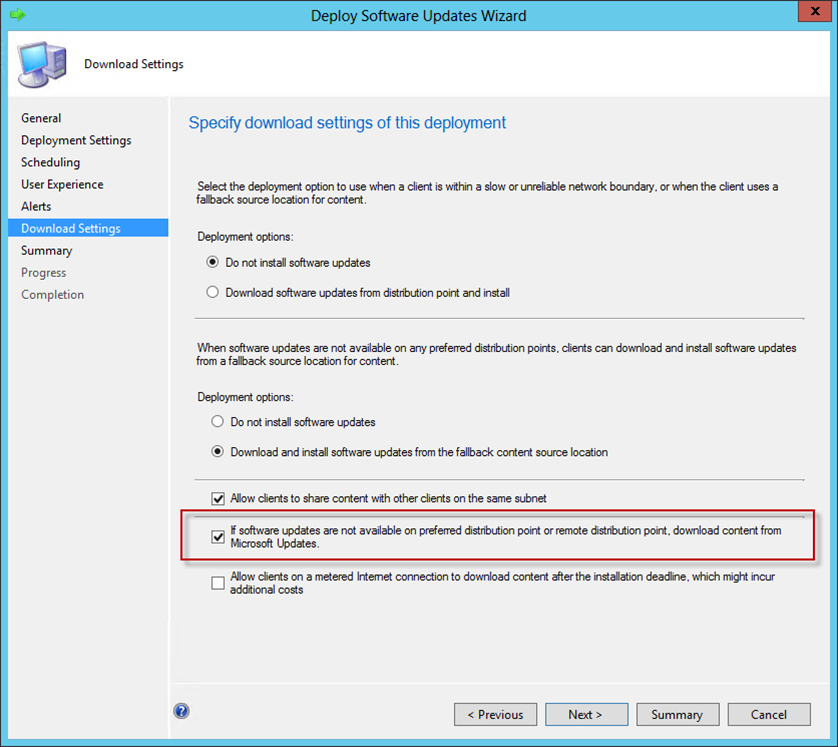
Utilizing Fall back for Software Updates in 2012 Sp1

"Starting in Configuration Manager SP1, you can configure a client on the intranet to download software updates from Microsoft Update if a distribution point is not available. " http://technet.microsoft.com/en-us/library/gg712304.aspx

Now that we have a way to make clients download updates from the Internet when an update is not found on a distribution point.   This is a unique feature but it does require updates be download and on at least 1 DP.

Now how can we utilize this new feature to cheat the clients.  This is how:

Scenario: Company of 15,000 machines has 300 machines left on Vista and 400 on Windows XP.  Network bandwith to the DP is limited and there are no more than 10 machines at each site.  This company is special because they have a proxy link to the Internet so all non-business traffic is sent directly to the internet.  But they must still patch all these computers.

Solution: Pick a single DP to hold the Vista and XP patches.  Create your Software Update Groups as usual but only deploy them to a single DP.  Why?  The XP/Vista clients will look at the local and remote DPs for software updates.  You must check both Boxes to "Download and install".  They will not find the updates so it will fail over to the Internet. Because the number of machines is small the company will not feel the internet traffic download and the admins don't need to distribute Vista or XP patches all over the world. 

This was not meant for the way I am pushing it but it does work. 

What it solves:
1. No network traffic to random DPS for Vista and XP patches
2. DP queue is open for other distributions.
3. Clients patch and compliance number will continue to rise
4. OS patches only need to be on 1 DP


Note: CU1 is required is you are running over alternate ports.  This corrects and issue of the client trying to use the alternate ports to contact Microsoft Updates

Saturday, April 6, 2013

2012 Console Extensions for 2012 SP1 Cu1

So I have been a bit busy lately with my 2012 Migration.  You have seen last year that I produced all the xml folders and files for the 2012 RTM extensions.  Well here is the updated version all the way up to CU1.  I haven't looked to see any of the Guids changed in CU1 but I wanted to make the note incase something did change.  If you try this on your Sp1 system and you are missing some guids, please drop me a line and I will see if I can spin up a 2012 SP1 site and export the guids. 

Realize that not all Guids are accessible, even if I have them listed.  What I am simply doing is pulling out all GUIDS the Microsoft references.  Nodes that are created on the fly when you click Show members don't have a guid and can't be accessed because they are dynamic nodes and are destroyed when you navigate away.

Please see this post to add images: http://sms-hints-tricks.blogspot.com/2012/04/console-extensions-2012-xml-insites.html

Also reference in the SDK are console extensions and how to add images and further manipulate the console.  http://msdn.microsoft.com/en-us/library/hh949463.aspx

Console files should be added here :
%ProgramFiles%\Microsoft Configuration Manager\AdminConsole\XmlStorage\Extensions\Actions\<GUID> folder, where <GUID> is the GUID identifier for the node that the action applies to.

Be aware that the console doesn't abide by file extensions so you can call the file .XXX and the console will still attempt to load it.  If you don't want it loaded then you should create a sub folder and then The console will ignore it. 

Please DO NOT install this on a production box.  The 620 console extensions here can cause the console to be slow or have problems.  I have broken down the folders into the different workspaces referenced.  Not all GUIDS will work, I simply export what Microsoft has.  If you find a problem with the same GUIDS you will need find the offending folder and delete it. 

The zip file can be downloaded here : 2012SP1CU1 Actions

Play responsibly :)

Sunday, August 21, 2011

ConfigMgr 2012 Console Extensions

Hopefully this will be one of many SCCM 2012 "Console Extensions". One thing you have already noticed is that 2012 is now Ribbon Based so we can't call them "Right Click" tools. You may already be familiar with Greg Ramsey's Guid Locator method for 2007. http://myitforum.com/cs2/blogs/gramsey/archive/2008/05/05/sccm-2007-console-extensions-guid-locator.aspx


Here is the version I created for 2012. Basically I looped through the XML Console files and create a tools folder and file based on each GUID in the Default section of the Ribbon. This might not be a totally exhaustive list but I think it should be a good start. The file/folders are pulled from the Beta 2 version currently downloaded from Microsoft.

The Zip file is the actions folder and should be extracted in the Actions Folder (
%ProgramFiles%\Microsoft Configuration Manager\AdminUI\XmlStorage\Extensions\Actions)

I hope to update this as the SDK is updateded. This way you can see the changes in the Console Extensions. Once everything is published I hope to see about creating a tool to converted the XML 2007 format to the XML 2012 format, which is slightly different.